
Build Your Own Company Enrichment Engine for Under £100
Research 10,000 companies in less than a day
Published: Jan 29, 2026
Last Updated: Apr 30, 2026

I recently built an automated company enrichment tool in around 27 hours. It takes a list of domains and names, finds the official UK Companies House data, extracts the directors, and drops it all back into a spreadsheet.
I built this for a client, a plumber’s merchant, who had 24,000 contacts but was missing company data for 10,000 of them. The other 14,000 we couldn’t prove were companies because we had no company name, and the email addresses were free emails, such as Gmail, Hotmail, MSN, etc. Without company data, they couldn’t segment their customers or offer pre-approved trade accounts with Allianz Trade Pay – part of a strategy to grow existing total account value.
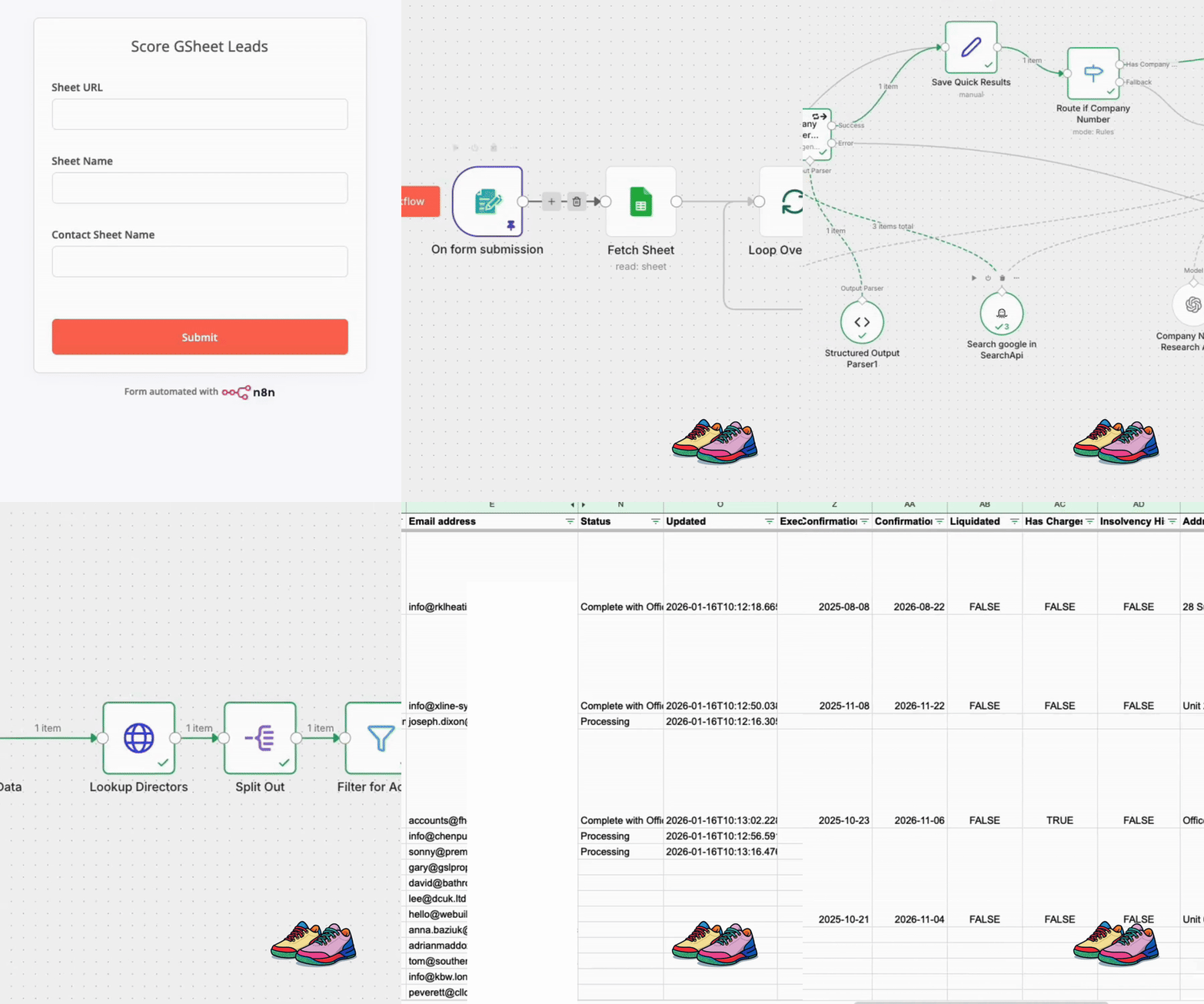
The professional version of this story is over on the Rixxo blog. This is the CTO version: how I built it, what it cost, and the technical trade-offs I made to get it done in a weekend(ish).
Enriching 10,000 Records Would Have Taken 1.4 Years of Manual Labour
I’ll start with the math. If you ask a person to Google a company, find their website, locate the company number, and then look up the directors on Companies House, it takes about 14 minutes per record.
For 10,000 companies, that is:
- 312.5 working days.
- About 1 year and 5 months of a full-time salary.
- Roughly £32,000 in wages before you even count NI or pension.
Even if someone is lightning-fast and does it in 5 minutes, you are still looking at 5 months of work and £10k in costs.
Automation here is basic arithmetic. Spending 27 hours of my time to avoid 5 to 18 months of manual work is a trade I will make every single time. Not because of a cost/time-saving, but because of the lost opportunity cost that five to 18 months creates.
The Lean Tech Stack: n8n, SerpAPI, and Companies House
I built this using a mix of low-code and custom API handling. I didn’t want a big monthly bill or a complex infrastructure to maintain.
The tools needed:
- n8n: I used the free version installed on a $10/month DigitalOcean droplet.
- OpenAI API: Pay-as-you-go for the actual “thinking”.
- SerpAPI: $25/month to let the agents search Google for company websites.
- Companies House API: Free, but it has strict rate limits.
- Google Sheets: For the input and the final data dump.
The Cost Breakdown
For 10,000 records, this is what it costs:
| Item | Cost | Notes |
|---|---|---|
| DigitalOcean droplet | £10/month | Runs n8n, Docker setup |
| OpenAI tokens (final) | ~£285 | 2.855p per record after optimisation |
| SerpAPI | £25/month | Google search results for agents |
| Companies House API | £0 | Free, rate-limited |
| My time (27 hours) | Variable | The real investment |
Total infrastructure cost for 10,000 records: under £100 in API spend, plus hosting.
Compare that to the £10,000 to £32,000 in wages for manual enrichment. The maths writes itself.
Scaling Past Rate Limits With API Key Rotation
One of the biggest hurdles was the Companies House API. It is excellent, but the default rate limit is 600 requests per 5-minute window. When you are running parallel agents, you hit that wall almost immediately.
Each record can trigger multiple API calls: company profile, officers list, officer details, and sometimes search endpoints. Five calls per record means you exhaust your limit after 120 records. That is not bulk enrichment.
Why Pre-Built Nodes Did Not Work
Initially, I used a pre-made n8n node. It worked for prototyping. It did not work for scale.
The problem: credentials in n8n are typically configured as a single key per node. You cannot rotate keys without custom code. And when you hit the rate limit, your entire workflow stalls waiting for the window to reset.
The Key Rotation Fix
I replaced the standard node with a custom HTTP node and a Code node. The Code node maintains a pool of API keys and selects the next one for every execution. Round-robin rotation, nothing clever.
keys = [key1, key2, key3, key4]

current_key = keys[execution_count % keys.length]
With four keys, I had four times the rate limit headroom. That removed the bottleneck entirely.
The actual blocker shifted to other things: SerpAPI response times, OpenAI token throughput, and the occasional unreachable website. All more interesting problems than “waiting for a rate limit to reset”.
Optimising Prompts Slashed Costs by 90%
Early on, I used GPT-5.2 for the heavy lifting. It was smart, but it was expensive. My initial tests were costing about 25p per lead. For 10,000 leads, that is £2,500.
I spent a few hours refining the prompt and dropped down to GPT-5.1-mini. Interestingly, ChatGPT helped me optimise my own prompts. I fed my long-winded instructions into ChatGPT and asked why my token count was so high. It pinpointed exactly where I was being redundant.
The results:
- Initial cost: 25p per lead.
- Final cost: 2.855p per lead.
- Total saving: Nearly 90%.
A Two-Agent Architecture Ensures Speed and Accuracy
I realised that running a deep research agent on every record was a waste of resources. I split the logic into two workflows.
Agent 1: Fast Pass
The first agent is “Fast and Simple”. It takes the domain, hits the homepage, and looks for the obvious company number. UK limited companies are legally required to display their registration number on their website. Most put it in the footer.
The agent scans the page for an 8-digit number that looks like a company registration. If it finds one, it validates it against Companies House immediately. Match found? Job done. Skip the expensive research entirely.
This agent handles roughly 60-70% of records. The easy wins are genuinely easy.
Agent 2: Deep Research
The second agent only triggers when Agent 1 fails. No company number in the footer? No obvious disclosure? Then we need to dig.
This agent uses SerpAPI to run Google queries like site:example.co.uk “company number” or site:example.co.uk “registered in England”. It reads the search results, identifies the most likely page (usually terms and conditions, privacy policy, or an “About” page), then scrapes that page for the registration number.
It costs more tokens. It takes longer. But it catches the companies that hide their details or use trading names that do not match their registered name.
The Handoff Logic
The decision point is simple: does Agent 1 return a validated company number?
If yes, bypass Agent 2 entirely. Pass the number straight to the Companies House enrichment node.
If no, queue the record for Agent 2. Log why Agent 1 failed (no number found, number invalid, website unreachable) so you can tune the fast pass later.
This tiered approach saved a significant amount of token usage and processing time. The biggest surprise was how often the fast pass worked. I expected 40% success. It was closer to 65%.
Batching and the ‘Don’t Sweat It’ Rule
When you are running 11,000 records, things will go wrong. APIs timeout. Websites are down. Free email domains (gmail, hotmail) clutter the list.
I learned to be pragmatic:
- Batching: Don’t try to run 11,000 in one go. I broke them into sheets of 1,000. It makes debugging easier.
- Two-Workflow System: The first workflow feeds the second one record at a time. If one record fails, it doesn’t kill the whole batch.
- The ‘Don’t Sweat It’ Rule: If an agent can’t find a company after two tries, I mark it as “Attempted not found” and move on. It is not worth spending an hour of my time to save 14 minutes of manual work for a single edge case.
Error Rates and When to Push Through
After tuning, errors landed at roughly 1 in 50. About 2%.
Most failures were not bugs. They were:
- Malformed data in the source (typos, merged fields, garbage domains)
- A momentary rate limit hit during that specific minute of execution
- Parked domains, expired sites, or sole traders with no company to find
With 10,000 records and the size of the prize, you push on. You do not stop a 60-hour automated run to manually fix every edge case.
The system writes “Attempted not found” and moves to the next record. At the end, you review the failures as a batch. Most are genuinely unfindable. A few are worth a quick manual check. The rest you accept as the cost of automation.
Chasing perfection destroys the economics. A 2% failure rate on 10,000 records is 200 rows. Reviewing 200 rows is a morning’s work. Enriching 9,800 rows manually would have taken over a year.
What The Data Unlocked
The point was never “enriched spreadsheet”. The point was what the client could do with that data.
Before enrichment, they had 10,000 business email addresses. They knew people had bought from them. They did not know who those people worked for, how big those companies were, or who the decision-makers were.
After enrichment:
- Segmentation by company size: Filing type and accounts data let them separate micro businesses from £10m+ turnover customers.
- Director context for sales: When you call someone and can reference their co-director by name, the conversation changes.
- Pre-approved trade accounts: With a company number, you can credit check. You can offer terms. You can stop losing customers to competitors who make buying easier.
The processing took about 60 hours of automated runtime. That is a few days of machine work instead of a year of manual work. The client had usable segmentation within a week.
Lessons From 27 Hours of Development
Building this reminded me of a similar experiment I did with AI parody songs. The tools exist to let us test ideas quickly and cheaply.
A decade ago, this project would have required a massive development budget and a team of data scrapers. Now, it is a weekend project for a CTO with a £100 budget.
The real barrier is not the technology anymore. It is the permission to stop doing things manually and start building systems that do the work for you.
Takeways
Use AI for discovery, not for clean data. The agent’s job is to find the company number from the messy web. Once you have that number, stop “thinking” and call an API. Structured data does not need intelligence.
Design for ugly cases from day one. Free email domains, parked sites, typos, trading names, merged companies. These are not edge cases in trades and building supplies. A good system needs a confidence score, evidence notes, a clear “not found” outcome, and a rerun path.
Optimisation comes from stopping early. Model choice matters. But the larger win was prompt design that stops once it has evidence. That shift took costs from “fine on a small test” to “comfortable at 10,000 records”.
Time-to-value beats cost savings. Manual enrichment makes you wait months for segmentation. Automation gives you usable data within days. The business can change what it does next week, not next year.
If you have a list of customer domains and no company data, the work is rarely “hard”. It is just time-consuming, expensive, and slow to deliver value.
Chris Gee
I am Founder & CEO of Rixxo, CTO and a Global Director of the B2B eCommerce Association and Tullio CC South West Captain. As a B2B eCommerce expert I am passionate about sharing my SPIN APE framework enabling businesses to make great B2B eCommerce platform selections.
Published: Jan 29, 2026
Last Updated: Apr 30, 2026


-
 Digital Transformation Dinner: Bristol, Ten Businesses, and Why I’m Doing It Again
 -
B2B eCommerce PlatformsThe Composable Commerce Correction: Why Bundled Is Back
-
 AIMaking a B2B eCommerce Parody Song with AI Tools (and What I Learned)
 -
Events & NetworkingThree practitioner stories from B2B eCommerce World that changed how I think about digital transformation
-
Events & NetworkingSavant B2B 2025
-
TechnologyOrderwise Live ’25: Practical Technology for Automation & Integration